Kamis, 02 Desember 2010

CCNA 1 labskill 8.4.3

Lab 8.4.3 Performing a Vulnerability Analysis
CAUTION: This lab may violate legal and organizational security policies. The security analyzer downloaded in this lab should only be used for instructional purposes in a lab environment. Before using a security analyzer on a live network, check with your instructor and network administration staff regarding internal policies concerning the use of these tools.
Objectives
  • Download and install security analyzer software.
  • Test a host to determine potential security vulnerabilities.
Background / Preparation
Security analyzers are valuable tools used by network administrators and auditors to identify network and
host vulnerabilities. There are many vulnerability analysis tools, also known as security scanners, available to test host and network security. In this lab, you will download and install the Microsoft Baseline Security Analyzer (MBSA). MBSA is designed to identify potential security issues related specifically to Microsoft operating systems, updates, and applications. It also identifies unnecessary services that may be running, as well as any open ports. MBSA runs on Windows Server and Windows XP systems and scans for common security misconfigurations and missing security updates for the operating system as well as most versions of Internet Information Server (IIS), SQL Server, Internet Explorer (IE), and Office products. MBSA offers specific recommendations to correct potential problems. This lab can be done individually or in teams of two. The following resources are required:
  • Computer running Windows XP Professional to act as the test station.
  • High-speed Internet connection for downloading MBSA (unless pre-installed).
  • Computer must be attached to the integrated router switch or a standalone hub or switch.
  • Optionally, you can have a server running a combination of DHCP, HTTP, FTP, and Telnet (preconfigured).
Step 1: Download and install MBSA
  1. Open a browser and go to the MBSA web page at: http://www.microsoft.com/technet/security/tools/mbsa2/default.mspx Jawab :
  • Command-line and Graphical User Interface (GUI) options
  • Scan local computer, remote computer, or groups of computer
  • Scan against Microsoft’s maintained list of updates (on Microsoft.com) or local server running Software Update Services 1.0
  • Scan for common security configuration vulnerabilitie
  • Scan for missing security updates
  • View reports in MBSA Graphical User Interface or Command Line Interface
  • Compatibility with SMS 2.0 and 2003 Software Update Services Feature Pac
  • Support for single processor and multiprocessor configurations
  • Localized to English, French, German, and Japanese although MBSA 1.2.1 can scan a machine of any local
  1. What is the latest version of MBSA available Answers will vary. Currently 2.0.1
  2. What are some of the features MBSA provides?  Answers will vary – From website: “detect common security misconfigurations and missing security updates on your computer systems”
  3. Scroll down the page and select the desired language to begin the download process.
  4. Click Continue to validate the copy of Microsoft Windows you are running.
  5. Click Download Files below and select the file you want to download. (The English setup file is MBSASetup-EN.msi). Click the Download button on the right of this file. How many megabytes is the file to download?  Answers will vary, approximately. Jawab : 11,5 MB
  6. When the File Download – Security Warning dialog box displays, click Save and download the file to a specified folder or the desktop. You can also run it from the download website.
  7. Once the download is complete, make sure all other applications are closed. Double-click the downloaded file. Click Run to start the Setup program, and then click Run if you are prompted with a Security Warning. Click Next on the MBSA Setup screen.
  8. Select the radio button to accept the license agreement and click Next. Accept the defaults as the install progresses, and then click Finish. Click OK on the final MBSA Setup screen, and close the folder to return to the Windows desktop.
Step 2: Build the network and configure the hosts
  1. Connect the host computer(s) to the integrated router, a hub, or a switch as shown in the topology diagram. Host-A is the test station where MBSA will be installed. The server is optional.
  2. Set the IP configuration for the host(s) using Windows XP Network Connections and TCP/IP properties. If the host is connected to the integrated router, configure it as a DHCP client; otherwise go to Step 1d.
  3. If the host is connected to a hub or switch and a DHCP server is not available, configure it manually by assigning a static IP address.
Which IP address and subnet mask does Host-A and the server (optional) have? Answer will vary – 192.168.1.X and 255.255.255.0. Default gateway is not required but could be set to 192.168.1.1 (the default IP address of the integrated router, if present).
Jawab :   IP Address : 192.168.24.09
Subnet Mask : 255.255.255.0

Step 3: Run MBSA on a host
  1. Double-click the desktop icon for MBSA or run it from Start > All Programs. When the main screen displays, which options are available? Scan a computer, Scan more than one computer, and View existing security reports.
Jawab :
    • Pick a computer to scan
    • Pick multiple computer to scan
    • Pick a security report to view
    • Help
    • About
    • Microsoft Security Web Site
Step 4: Select a computer to scan
  1. On the left side of the screen, click Pick a computer to scan. The computer shown as the default is the one on which MBSA is installed.
  2. What are the two ways to specify a computer to be scanned?  By name and by IP address.
  3. Accept the default computer to be scanned. De-select Check for IIS and SQL administrative vulnerabilities, since these services are not likely to be installed on the computer being scanned. Click Start Scan.
Step 5: View security update scan results
  1. View the security report. What are the results of the security update scan? Answer will vary. See screen below for possibilities. Missing Security Updates are indicated by a red X in the Score column. Missing Update Rollups and Service Packs are indicated by a yellow X
  2. If there are any red or yellow Xs, click How to correct this. Which solution is recommended? Answer will vary – Most often to download updates and service packs from Microsoft Update website

Step 6: View Windows scan results in the security report
  1. Scroll down to view the second section of the report that shows Windows Scan Results. Were there any administrative vulnerabilities identified? Answers will vary. See screen below for some possibilities
  2. On the Additional System Information section of the screen (below), in the Issue column for Services, click What was scanned, and click Result details under the Result column to get a description of the check that was run. What did you find? When finished, close both popup windows to return to the security report. … ..Answers will vary. Telnet and some other services may be installed and running. Port numbers will be listed
Step 7: View Desktop Application Scan Results in the Security report
  1. Scroll down to view the last section of the report that shows Desktop Applications Scan Results. Were there any administrative vulnerabilities identified? Answers will vary. See screen below for some possibilities.
  2. How many Microsoft Office products are installed? Answers will vary
  3. Were there any security issues with Macro Security for any of them? Answers will vary
Step 8: Scan a server, if available
  1. If a server with various services is available, click Pick a computer to scan from the main MBSA screen and enter the IP address of the server, and then click Start Scan. Which security vulnerabilities were identified?                                                                                           Answers will vary depending on the server. This can be a live server if the host has physical and logical access to it and organizational policies permit scanning the live network
  2. Were there any potentially unnecessary services installed? Which port numbers were they on?                                                                  Answers will vary depending on the server. Could include Telnet, HTTP, FTP, and so on, with corresponding port numbers
Step 9: Uninstall MBSA using Control Panel Add/Remove Programs
  1. This step is optional, depending on whether the host will be automatically restored later by a network process.
  2. To uninstall MBSA, click Start > Control Panel > Add/Remove Programs. Locate the MBSA application and uninstall it. It should be listed as Microsoft Baseline Security Analyzer 2.0.1. Click Remove, and then click Yes to confirm removal of the MBSA application. When finished, close all windows to return to the desktop.

Step 10: Reflection
  1. The MBSA tool is designed to identify vulnerabilities for Windows-based computers. Search the Internet for other tools that might exist. List some of the tools discovered. Answers will vary.
Jawab :
  • Client versions of Windows, including Windows
  • Windows Server, including Windows Server 2008
  • SQL Server
  • Internet Information Server (IIS)
  • Internet Explorer
  • Microsoft Office
  1. Which tools might there be for non-Windows computers? Search the Internet for other tools that might exist and list some of them here. Answers will vary.
  2. Which other steps could you take to help secure a computer against Internet attacks? Answers will vary

CCNA 1 Labskill 8.4.2

Lab 8.4.2 Configuring Access Policies and DMZ Settings
Objectives
  • Log in to a multi-function device and view security settings.
  • Set up Internet access policies based on IP address and application.
  • Set up a DMZ for an open access server with a static IP address.
  • Set up port forwarding to limit port accessibility to only HTTP.
  • Use the Linksys WRT300N Help features.
Background / Preparation
This lab provides instructions for configuring security settings for the Linksys WRT300N. The Linksys provides a software-based firewall to protect internal, local-network clients from attack by external hosts. Connections from internal hosts to external destinations can be filtered based on the IP address, destination website, and application. The Linksys can also be configured to create a demilitarized zone (DMZ) to control access to a server from external hosts. This lab is done in teams of two, and two teams can work together to test each other’s access restrictions and DMZ functionality. It is divided into 2 parts:
  • Part 1 – Configuring access policies
  • Part 2 – Configuring DMZ settings
The following resources are required:
  • Linksys WRT300N or other multi-function device with the default configuration
  • User ID and password for the Linksys device if different than the default
  • Computer running Windows XP Professional to access the Linksys GUI
  • Internal PC to act as a server in the DMZ with HTTP and Telnet servers installed (preconfigured or
  • Discovery Live CD server)
  • External server to represent the ISP and Internet (with preconfigured DHCP, HTTP, and Telnet
  • servers running (real server with services installed or Discovery Live CD server)
  • Cabling to connect the PC hosts, Linksys WRT300N or multi-function device, and switches
Part 1 – Configuring access policies
Step 1: Build the network and configure the hosts
  1. Connect the host computers to switch ports on the multi-function device as shown in the topology diagram. Host-A is the console and is used to access the Linksys GUI. Host-B is initially a test machine but later becomes the DMZ server.
  2. Configure the IP settings for both hosts using Windows XP Network Connections and TCP/IP properties. Verify that Host-A is configured as a DHCP client. Assign a static IP address to Host-B in the 192.168.1.x range with a subnet mask of 255.255.255.0. The default gateway should be the internal local network address of the Linksys device.
NOTE: If Host-B is already a DHCP client, you can reserve its current address and make it static using the DHCP Reservation feature on the Linksys Basic Setup screen.
c.   Use the ipconfig command to display the IP address, subnet mask, and default gateway for Host-A and Host-B and record them in the table. Obtain the IP address and subnet mask of the external server from the instructor and record it in the table
Host
IP Address
Subnet Mask
Default Gateway
Host A
192.168.24.9
255.255.255.0
192.168.24.1
Host-B / DMZ Server
192.168.34.9
255.255.255.0
192.168.34.1
External Server
192.168.44.9
255.255.255.0
192.168.44.1
Step 2: Log in to the user interface
  1. To access the Linksys or multi-function device web-based GUI, open a browser and enter the default internal IP address for the device, normally 192.168.1.1.
  2. Log in using the default user ID and password, or check with the instructor if they are different.
  3. The multi-function device should be configured to obtain an IP address from the external DHCP server. The default screen after logging in to the multi-function device is Setup > Basic Setup. What is the Internet connection type? Jawab : wireless internet connection
  4. What is the default router (internal) IP address and subnet mask for the multi-function device? Jawab: IP address : 192.168.1.1 Subnet mask : 255.255.255.0
  5. Verify that the multi-function device has received an external IP address from the DHCP server by clicking the Status > Router tab.
  6. What is the external IP address and subnet mask assigned to the multi-function device? Jawab: IP address : 192.168.2.1, Subnet mask : 255.255.255.0
Step 3: View multi-function device firewall settings
  1. The Linksys WRT300N provides a basic firewall that uses Network Address Translation (NAT). In addition, it provides additional firewall functionality using Stateful Packet Inspection (SPI) to detect and block unsolicited traffic from the Internet.
  2. From the main screen, click the Security tab to view the Firewall and Internet Filter status. What is the status of SPI Firewall protection? Jawab : status SPI firewall protection : enabled.
  3. Which Internet Filter checkboxes are selected? Jawab :   Internet filter yang digunakan : filter anonymous internet request, filter IDENT (port 113).
  4. Click Help to learn more about these settings. What benefits does filtering IDENT provide? Jawab: mencegah penyusup dari luar menyerang router melalui internet.
Step 4: Set up Internet access restrictions based on IP address
In Lab 7.3.5, you saw that wireless security features can be used to control which wireless client computers can access the multi-function device, based on their MAC address. This prevents unauthorized external computers from connecting to the wireless access point (AP) and gaining access to the internal local network and the Internet.
The multi-function device can also control which internal users can get out to the Internet from the local network. You can create an Internet access policy to deny or allow specific internal computers access to the Internet based on the IP address, MAC address, and other criteria.
  1. From the main multi-function device screen, click the Access Restrictions tab to define Access Policy 1.
  2. Enter Block-IP as the policy name. Select Enabled to enable the policy, and then select Deny to prevent Internet access from a specified IP address.
  3. Click the Edit List button and enter the IP address of Host-B. Click Save Settings and then Close. Click Save Settings to save Internet Access Policy 1 – Block IP.
  4. Test the policy by attempting to access the external web server from Host-B. Open a browser and enter the IP address of the external server in the address area. Are you able to access the server? Jawab : Ya.
  5. Change the status of the Block-IP Policy to Disabled and click Save Settings. Are you able to access the server now? Jawab : Tidak
  6. What other ways can access policies be used to block Internet access? Jawab: menggunakan proxy
Step 5: Set up an Internet access policy based on an application
You can create an Internet access policy to block specific computers from using certain Internet applications or protocols on the Internet.
  1. From the main Linksys GUI screen, click the Access Restrictions tab to define an Internet Access Policy.
  2. Enter Block-Telnet as the policy name. Select Enabled to enable the policy, and then click Allow to permit Internet access from a specified IP address as long as it is not one of the applications that is blocked.
  3. Click the Edit List button and enter the IP address of Host-B. Click Save Settings and then Close. What other Internet applications and protocols can be blocked?
  4. Select the Telnet application from the list of applications that can be blocked and then click the double right arrow to add it to the Blocked List. Click Save Settings.
  5. Test the policy by opening a command prompt using Start > All Programs > Accessories > Command Prompt.
  6. Ping the IP address of the external server from Host-B using the ping command. Are you able to ping the server? Ya.
  7. Telnet to the IP address of the external server from Host-B using the command telnet A.B.C.D (where A.B.C.D is the IP address of the server).
  8. Are you able to telnet to the server? No.
NOTE: If you are not going to perform lab Part 2 at this time and others will be using the equipment after you, skip to Step 3 of Part 2 and restore the multi-function device to its default settings.
Part 2 – Configuring a DMZ on the multi-function device
Step 1: Set up a simple DMZ
It is sometimes necessary to allow access to a computer from the Internet while still protecting other internal local network computers. To accomplish this, you can set up a demilitarized zone (DMZ) that allows open access to any ports and services running on the specified server. Any requests made for services to the outside address of the multi-function device will be redirected to the server specified.
  1. Host-B will act as the DMZ server and should be running HTTP and Telnet servers. Verify the Host-B has a static IP address or, if Host-B is a DHCP client, you can reserve its current address and make it static using the DHCP Reservation feature on the Linksys device Basic Setup screen.
  2. From the main Linksys GUI screen, click the Applications & Gaming tab then click DMZ.
  3. Click Help to learn more about the DMZ. For what other reasons might you want to set up a host in the DMZ? Jawab : karena DMZ berguna untuk menambahkan lapisan keamanan untuk LAN.
  4. The DMZ feature is disabled by default. Select Enabled to enable the DMZ. Leave the Source IP Address selected as Any IP Address, and enter the IP address of Host-B in the Destination IP address. Click Save Settings and click Continue when prompted.
  5. Test basic access to the DMZ server by pinging from the external server to the outside address of the multi-function device. Use the ping –a command to verify that it is actually the DMZ server responding and not the multi-function device. Are you able to ping the DMZ server? Ya.
  6. Test HTTP access to the DMZ server by opening a browser on the external server and pointing to the external IP address of the multi-function device. Try the same thing from a browser on Host-A to Host-B using the internal addresses. Are you able to access the web page? Ya.
  7. Test Telnet access by opening a command prompt as described in Step 5. Telnet to the outside IP address of the multi-function device using the command telnet A.B.C.D (where A.B.C.D is the outside address of the multi-function device).
  8. Are you able to telnet to the server? Tidak.
Step 2: Set up a host with single port forwarding
The basic DMZ hosting set up in Step 6 allows open access to all ports and services running on the server, such as HTTP, FTP, and Telnet,. If a host is to be used for a particular function, such as FTP or web services, access should be limited to the type of services provided. Single port forwarding can accomplish this and is more secure than the basic DMZ, because it only opens the ports needed. Before completing this step, disable the DMZ settings for step 1.
Host-B is the server to which ports are forwarded, but access is limited to only HTTP (web) protocol.
a.      From the main screen, click the Applications & Gaming tab, and then click Single Port Forwarding to specify applications and port numbers.
b.      Click the pull-down menu for the first entry under Application Name and select HTTP. This is the web server protocol port 80.
c.      In the first To IP Address field, enter the IP address of Host-B and select Enabled. Click Save Settings.
d.      Test HTTP access to the DMZ host by opening a browser the external server and pointing to the outside address of the multi-function device. Try the same thing from a browser on Host-A to Host-B. Are you able to access the web page?
Jawab : Ya.
e.      Test Telnet access by opening a command prompt as described in Step 5. Attempt to telnet to the outside IP address of the multi-function device using the command telnet A.B.C.D (where A.B.C.D is the outside IP address of the multi-function device).
Are you able to telnet to the server? No.
Step 3: Restore the multi-function device to its default settings
a.      To restore the Linksys to its factory default settings, click the Administration > Factory Defaults tab.
b.      Click the Restore Factory Defaults button. Any entries or changes to settings will be lost.

CCNA Discovery 3 Module 4

1. A network engineer is implementing a network design using VLSM for network 192.168.1.0/24. After subnetting the network, the engineer has decided to take one of the subnets, 192.168.1.16/28 and subnet it further to provide for point-to-point serial link addresses. What is the maximum number of subnets that can be created from the 192.168.1.16/28 subnet for serial connections? 
• 4 

2. When running NAT, what is the purpose of address overloading? 
• allow multiple inside addresses to share a single global address 

3. What two advantages does CIDR provide to a network? (Choose two.) 
• dynamic address assignment 
• reduced routing update traffic 

4. How does a router keep track of which inside local address is used when NAT overload is configured?
• The router uses TCP or UDP port numbers. 

5. What is a characteristic of a classful routing protocol on the network?  
• Updates received by a router in a different major network have the default mask applied. 

6. Refer to the exhibit. Which address is an inside global address? 
• 198.18.1.55 

7. Refer to the exhibit. All networks that are shown have a /24 prefix. Assuming that all routes have been discovered by all routers in the network, which address will successfully summarize only the networks that are shown?  
• 192.168.16.0/21 

8. What is the CIDR prefix designation that summarizes the entire reserved Class B RFC 1918 internal address range? 
• /16 

9. Which NAT term refers to the IP address of your inside host as it appears to the outside network? 
• inside local IP address  

10. A network administrator is asked to design a new addressing scheme for a corporate network. Presently, there are 500 users at the head office, 200 users at sales, 425 at manufacturing, and 50 at the research site. Which statement defines the correct VLSM addressing map with minimal waste using the 172.16.0.0/16 network?  
• 172.16.2.0/23 head office
172.16.4.0/23 manufacturing
172.16.6.0/24 sales
172.16.7.0/26 research
  

11. A company using a Class B IP addressing scheme needs as many as 100 subnetworks. Assuming that variable length subnetting is not used and all subnets require at least 300 hosts, what subnet mask is appropriate to use? 
• 255.255.254.0 

12. Host A in the exhibit is assigned the IP address 10.118.197.55/20. How many more network devices can be added to this same subnetwork? 
• 4093 

13. Refer to the exhibit. RIP version 2 is configured as the network routing protocol and all of the default parameters remain the same. Which update is sent from R2 to R3 about the 10.16.1.0/24 network connected to R1? 
• 10.16.0.0/16 

14. What range of networks are summarized by the address and mask, 192.168.32.0/19?
• 192.168.32.0/24 – 192.168.63.0/24

15. Refer to the exhibit. Based on the output of the show ip nat translations command, which kind of address translation is in effect on this router?
• overload

16. How many addresses will be available for dynamic NAT translation when a router is configured with the following commands?
• 8

17. Refer to the exhibit. Which two IP addresses could be assigned to the hosts that are shown in the exhibit? (Choose two.)
• 192.168.65.35
• 192.168.65.60


18. What are the network and broadcast addresses for host 192.168.100.130/27? (Choose two.)
• network 192.168.100.128
• broadcast 192.168.100.159

19. Refer to the exhibit. Which two are valid VLSM network addresses for the serial link between Router1 and Router2? (Choose two.)
• 192.168.1.4/30
• 192.168.1.8/30


20. When configuring NAT on a Cisco router, what is the inside local IP address?
• **c the IP address of an inside host as it appears to the inside network

Kamis, 25 November 2010

CCNA Discovery 3 Module 3

     1.
            1

Refer to the exhibit. What two statements can be concluded from the information that is shown in the exhibit? (Choose two.)
• All ports that are listed in the exhibit are access ports.
• ARP requests from Host1 will be forwarded to Host2.
• Attaching Host1 to port 3 will automatically allow communication between both hosts.
• The default gateway for each host must be changed to 192.168.3.250/28 to allow communication between both hosts.
• A router connected to the switch is needed to forward traffic between the hosts.

2.     
2
A router is configured to connect to a trunked uplink as shown in the exhibit. A packet is received on the FastEthernet 0/1 physical interface from VLAN 10. The packet destination address is 192.168.1.120. What will the router do with this packet?
• The router will forward the packet out interface FastEthernet 0/1.1 tagged for VLAN 10.
• The router will forward the packet out interface FastEthernet 0/1.2 tagged for VLAN 60.
• The router will forward the packet out interface FastEthernet 0/1.3 tagged for VLAN 60.
• The router will forward the packet out interface FastEthernet 0/1.3 tagged for VLAN 120.
• The router will not process the packet since the source and destination are on the same subnet.
• The router will drop the packet since no network that includes the source address is attached to the router.

3.      The information contained in a BPDU is used for which two purposes? (Choose two.)
• to prevent loops by sharing bridging tables between connected switches
• to set the duplex mode of a redundant link
• to determine the shortest path to the root bridge
• to determine which ports will forward frames as part of the spanning tree

• to activate looped paths throughout the network

4.      A router has two serial interfaces and two Fast Ethernet interfaces. This router must be connected to a WAN link and to a switch that supports four VLANs. How can this be accomplished in the most efficient and cost-effective manner to support inter-VLAN routing between the four VLANs?
• Connect a smaller router to the serial interface to handle the inter-VLAN traffic.
• Add two additional Fast Ethernet interfaces to the router to allow one VLAN per interface.
• Connect a trunked uplink from the switch to one Fast Ethernet interface on the router and create logical subinterfaces for each VLAN.
• Use serial-to-Fast Ethernet transceivers to connect two of the VLANs to the serial ports on the router. Support the other two VLANs directly to the available FastEthernet ports.

5.      When are MAC addresses removed from the CAM table?
• at regular 30 second intervals
• when a broadcast packet is received
• when the IP Address of a host is changed
• after they have been idle for a certain period of time

6.     
3

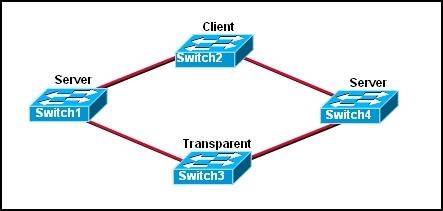
Refer to the exhibit. Switch1 is not participating in the VTP management process with the other switches. Which two are possible reasons for this? (Choose two.)
• Switch2 is in transparent mode.
• Switch1 is in client mode.
• Switch1 is using VTP version 1 and Switch2 is using VTP version 2.
• Switch2 is in server mode.
• Switch1 is in a different management domain.
• Switch1 has no VLANs.

7.      Which three must be used when a router interface is configured for VLAN trunking? (Choose three.)
• one subinterface per VLAN
• one physical interface for each subinterface
• one IP network or subnetwork for each subinterface
• one trunked link per VLAN
• a management domain for each subinterface
• a compatible trunking protocol encapsulation for each subinterface

8.     
4
 
Refer to the exhibit. The switches are connected with trunks within the same VTP management domain. Each switch is labeled with its VTP mode. A new VLAN is added to Switch3. This VLAN does not show up on the other switches. What is the reason for this?
• VLANs cannot be created on transparent mode switches.
• Server mode switches neither listen to nor forward VTP messages from transparent mode switches.
• VLANs created on transparent mode switches are not included in VTP advertisements.
• There are no ports assigned to the new VLAN on the other switches.
• Transparent mode switches do not forward VTP advertisements.

9.      Which two criteria are used by STP to select a root bridge? (Choose two.)
• memory size
• bridge priority
• switching speed
• number of ports
• base MAC address
• switch location

10.  Which three steps should be taken before moving a Catalyst switch to a new VTP management domain? (Choose three.)
• Reboot the switch.
• Reset the VTP counters to allow the switch to synchronize with the other switches in the domain.

• Download the VTP database from the VTP server in the new domain.
• Configure the VTP server in the domain to recognize the BID of the new switch.
• Select the correct VTP mode and version.
• Configure the switch with the name of the new management domain.

11.  Which two items will prevent broadcasts from being sent throughout the network? (Choose two.)
• bridges
• routers
• switches
• VLANs
• hubs

12.  Which two characteristics describe a port in the STP blocking state? (Choose two.)
• provides port security
• displays a steady green light
• learns MAC addresses as BPDUs are processed
• discards data frames received from the attached segment
• receives BPDUs and directs them to the system module

13.  What is the first step in the process of convergence in a spanning tree topology?
• election of the root bridge
• determination of the designated port for each segment
• blocking of the non-designated ports
• selection of the designated trunk port
• activation of the root port for each segment

14.  In which STP state does a switch port transmit user data and learn MAC addresses?
• blocking
• learning
• disabling
• listening
• forwarding
15.  What is the purpose of VTP?
• maintaining consistency in VLAN configuration across the network
• routing frames from one VLAN to another
• routing the frames along the best path between switches
• tagging user data frames with VLAN membership information
• distributing BPDUs to maintain loop-free switched paths

16.  Which statement best describes adaptive cut-through switching?
• The switch initially forwards all traffic using cut-through switching and then changes to store-and-forward switching if errors exceed a threshold value.
• The switch initially forwards all traffic using cut-through switching and then changes to fast-forward switching if errors exceed a threshold value.

• The switch initially forwards all traffic using cut-through switching and then temporarily disables the port if errors exceed a threshold value.
• The switch initially forwards all traffic using store-and-forward switching and then changes to cut-through switching if errors exceed a threshold value.

17.  Using STP, how long does it take for a switch port to go from the blocking state to the forwarding state?
• 2 seconds
• 15 seconds
• 20 seconds
• 50 seconds
18.   
5
Refer to the exhibit. The switches are interconnected by trunked links and are configured for VTP as shown. A new VLAN is added to Switch1. Which three actions will occur? (Choose three.)
• Switch1 will not add the VLAN to its database and will pass the update to Switch 2.
• Switch2 will add the VLAN to its database and pass the update to Switch3.
• Switch3 will pass the VTP update to Switch4.

• Switch3 will add the VLAN to its database.
• Switch4 will add the VLAN to its database.
• Switch4 will not receive the update.

19.  Which Catalyst feature causes a switch port to enter the spanning-tree forwarding state immediately?
• backbonefast
• uplinkfast
• portfast
• rapid spanning tree

20.   
6
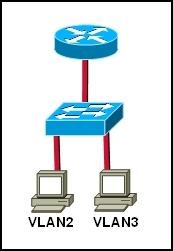
Refer to the exhibit. Which set of commands would be used on the router to provide communication between the two hosts connected to the switch?
• Router(config)# interface vlan 2
Router(config-if)# ip address 192.168.2.1 255.255.255.0
Router(config-if)# no shutdown
Router(config)# interface vlan 3
Router(config-if)# ip address 192.168.3.1 255.255.255.0
Router(config-if)# no shutdown
• Router(config)# interface fastethernet 0/0
Router(config-if)# no shutdown
Router(config-if)# interface fastethernet 0/0.2
Router(config-subif)# encapsulation dot1q 2
Router(config-subif)# ip address 192.168.2.1 255.255.255.0
Router(config-if)# interface fastethernet 0/0.3
Router(config-subif)# encapsulation dot1q 3
Router(config-subif)# ip address 192.168.3.1 255.255.255.0
• Router(config)# interface vlan 2
Router(config-if)# switchport mode trunk dot1q
Router(config)# interface vlan 3
Router(config-if)# switchport mode trunk dot1q
• Router(config)# interface fastethernet 0/0
Router(config-if)# mode trunk dot1q 2 3
Router(config-if)# ip address 192.168.2.1 255.255.255.0v

CCNA2 Chapter 8

Lab 8.1.3 Security local data and transmitted data
Part 1
Step 1: secure bobs files folder
Step 2: test joes access to bobs files
Part 2
Step 1: identify a secure web page
Step 2: examine secure access to an untrusted source warming

Lab 8.2.1 planning for access lists and port filters
Step 1: Restrict Client A to one subnet
You are asked to restrict client A to only the subnet to which it is currently attached. Client A needs to be able to access server A. but it does not need to accsess the internet or server B. where would you place the access list?
Router
Interface
Allow or Deny?
Input or output filter?
Why?
Router 2
0/0 dan 0/1
deny
input
Karena hanya untuk mengekses server yang berada di internal jaringan dan tidak bisa untuk eksternal jaringan atau jaringan luar
Step 2: Restrict client A access to server A but allow access to server B the internet
You are asked to restrict client B from accessing server B needs internet access and access to server B. where would you place the access list?
Router
Interface
Allow or Derry?
Input or output filter?
Why?
Router 1 dan 3
0/0 dan 0/1
allow
output
Karena diizinkan untu mengakses jaringan internal dan eksternal

Step 3: Allow only client A to access the routers using only SSH
You have been asked to secure access to the routers for only client A. which will be the management PC for those routers. You want to limit access to only SSH from Client A and prevent telnet access. Where would you place the access list?
Router
Interface
Input or output filter?
Port
Allow or Deny?
Why?
Router 1
0/0 dan 0/1
input
0
deny
Jaringan internal
Router 2
0/0 dan 0/1
output
0
allow
Jaringan eksternal
Router3
0/0 dan 0/1
output
0
allow
Jaringan eksternal

Lab 8.2.5 Researching an Anti-X Software Product
Step 1: identify three products
Company
Product
smadav
Smadav
morphic
Morposh
Avira
Avira

Step 2: Compare pricing
Company
Product
Price
microsoft
Windows
Rp.1.500.000

Linux
free
aple
machintosh
Rp.5.000.000

Lab 8.3.1 Interpreting a service level agreement
Step 1: review typical customer needs
Step 2: Analyze a sample SLA and identify key components
a.       Read over the sample SLA that follows and answer these questions regarding content, ISP responsibilities, and customer requirements.
b.      According to this agreement, can the ISP be held liable for damage to equipment owned by the customer [Client] or data loss that occurs due to accidental actions by ISP vendor staff or other persons? bisa
c.       What are some examples of One Time Services included in the SLA? E-mail service, electronic interchange, online accounting, secure remote workerr support, remote indtrumentation and control system, and backup and recovery service.
d.      What are some examples of On going Services included in the SLA? E-mail service, online acounting
e.       When will regular downtime maintenance be scheduled and how many business days notice must the ISP give of any scheduled downtime? Banyak jam dalam satu hari dan banyak hari dalam senulan.What does the ISP’s network monitoring system do when an error condition is detected? What is the stated availability of the Systems Administrators in the event of a system failure? What is “usage monitoring” and how does the ISP provide this service? Dengan memantau kerja sistem
f.        Regarding problem severity and ISP response time, what is the difference in response between “Level 1 – normal business hours” and “Level 3 – normal business hours”? pada level satu baru mendeteksi problem dan pada level 3 sudah ada pengontrolan
g.      On what factors are the penalties for service outages based?  Provides an estimate for the cost to the customer for a service outage for each of the services the customer wants covered by an SLA.

Lab 8.3.2 conducting a Network capture with wireshark
Step 1: install and launch Wireshark
Step 2: select an interface to  use for capturing pakets
Step 3 : Analysyze web trafict information (optional)
a.       The conection to the google server with a query to the DNS server to lookup the server IP address. The destination server IP address will most likely start with 64.x.x.x what is the source and destination of the first packet sent to the google server?
Source: 192.168.1.103
Destination: 65.24.7.3
b.      Open another browser window and go to the ARIN who is database http://www.arin .net/whois/ or use another whois lookup tool and enter thr IP address of the destination server. To what organization is this IP address assigned? 192.168.1.103
c.       What are the protocols is used to establish the connection to the web server and deliver the web page to your local host? TCP
d.      What is the color used to establish the connection to the server and deliver the web page to your local host? hijau
e.       What is the color used to highlight the traffic between your host and the google web server? gray
Step 5: filter a network capture
a.       Open a command prompt window by clicking start > all programs > run and typing cmd.
b.      Ping a host IP address on your local network and observer? ICMP
c.       When icmp is typed in the filter text box what kind of raffic is was displayed? Ketika kita menge-ping host IP address yang ada di jaringan local kita
d.      Click the filter: Expression button on the wireshark eindow. Scroll down the list and view the filter possibilities there. Are TCP, HTTP,ARP and other protocols listed? Ya ada
Step 6:reflection
a.       There are hundreads of filters listed in the filter: expression option. It may be possible that, in a large network , there would be enormounts and many different types of traffic. Which three filters in the long list do you think might be most useful to a network administrator
b.      Is wreshark a tool for out of band or in band network monitoring
Explain your answare

Lab 8.4.2 planning a backup solution
step 1: choose the media and backup hardware
Equipment / media
price
quality
USB and solid-state drives
$30-$90
medium
fireWire drives
$180
best
CD-RW and DVD+RW/-RW drives
$100
medium

Step 2: design a backup plan and procedure
a.       Describe the equipment recommended and explain why you selected this equipment
Saya memilih media di atas Karena saya melihat dari segi kapasitas dan segi ekonomis
b.      Describe location of the equipment in the network and the network link speeds to the equipment
c.       Describe the backup media to be used and also explain why you selected this media
d.      Describe the backup schedule
e.       Describe the backup and restore procedure, including what kind of backup (Normal, differential, incremental), how it will be tested what kind of maintenance the equipment requires. How tapes will be labeled and where tapes that have been backed up will be stored. When backups need to be restored, what is the procedure for a file a folder a driver (use extra sheets it necessary)